What is Jenkins? Complete Introduction and Setup Guide 🔧⚙️
Part 1
Continuous Integration (CI)
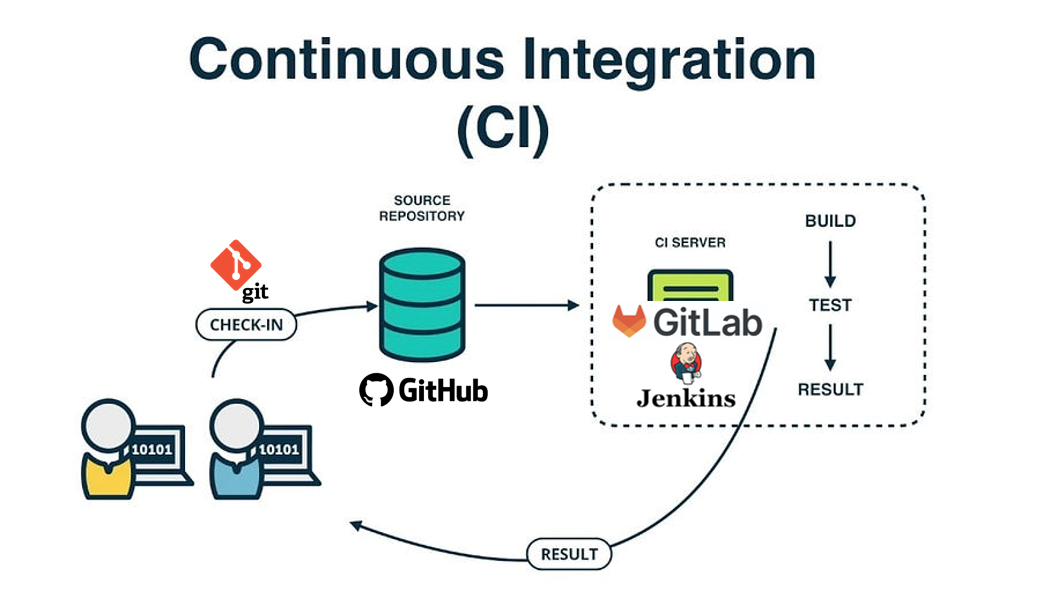
It is a DevOps practice where code is frequently integrated into a shared repository, followed by automated build and testing processes.
The main goal of CI is to detect issues early, improve software quality, and speed up delivery.
Before Continuous Integration
Earlier, software development followed a very traditional approach:
Developers focused only on writing code
Separate integration teams handled code merging and builds
Dedicated testing teams validated the application
This resulted in:
Larger team sizes
Increased human effort and cost
Delayed releases
Higher chances of integration failures because code was merged very late
After Continuous Integration
With CI tools, the process became automated and efficient. Now:
Developers simply push their code to a Version Control System (like Git)
The CI server automatically pulls the latest code
It then builds the application and runs automated tests
This automation reduces manual effort, improves collaboration, minimizes errors, and accelerates software delivery.
Continuous Delivery/Deployment (CD)
After Continuous Integration handles build and testing, the next important DevOps stage focuses on getting the application into production efficiently. This is where Continuous Delivery (CD) and Continuous Deployment come into play.
Both practices aim to make software releases faster, reliable, and less manual, but they differ slightly in how the final deployment happens.
Continuous Delivery
Continuous Delivery ensures that every code change which passes automated testing is packaged, validated, and kept ready for production deployment.
However, the final move to production still requires a manual approval or trigger.
Software is always in a deployable state
Reduces release risks
Faster and predictable deployments
Gives organizations control with manual approval
Simply put:
Code → Build → Test → Ready for Production (Manual Approval Required)
Continuous Deployment
Continuous Deployment takes automation to the next level.
Here, once the code passes all the automated tests, it is automatically deployed to production without any human intervention.
Extremely fast feature delivery
Immediate user feedback
Eliminates manual effort
Highly automated and efficient pipeline
Simply put:
Code → Build → Test → Automatically Goes to Production

Today, CI/CD can be implemented end-to-end using various automation tools. These tools help manage code integration, building, testing, and deployment in a seamless pipeline. Popular CI/CD platforms include:
Jenkins
Azure DevOps Pipelines
AWS CodePipeline
GitLab CI/CD
GitHub Actions
Let’s learn Jenkins step by step! 🧑💻
Jenkins is an open-source automation server written in Java. It supports a rich ecosystem of plugins, which extend its functionality similar to how we install apps on a mobile phone to get extra features.
Plugins help Jenkins integrate with tools like Git, Docker, Kubernetes, Maven, Cloud platforms, and more, making CI/CD pipelines powerful and flexible.
Since Jenkins is built using Java, we must install Java on the server before running Jenkins.
yum install java-17-amazon-corretto -y #To install java
java -version #To get java version
By default, Jenkins runs on port 8080.
To quickly set up Jenkins on an EC2 instance, simply run the below commands:
sudo yum update –y
sudo wget -O /etc/yum.repos.d/jenkins.repo https://pkg.jenkins.io/redhat-stable/jenkins.repo
sudo rpm --import https://pkg.jenkins.io/redhat-stable/jenkins.io-2023.key
sudo yum upgrade
sudo yum install java-17-amazon-corretto -y
sudo yum install jenkins git -y
sudo systemctl enable jenkins
sudo systemctl start jenkins
sudo systemctl status jenkins
Open your browser and enter:
http://<EC2-Public-IP>:8080
Copy the default administrator password using the command below
cat /var/lib/jenkins/secrets/initialAdminPassword
Paste it into the Jenkins setup screen, complete the administrator profile, install recommended plugins, and Jenkins is ready to use 😉
Conclusion
Jenkins is a powerful and flexible DevOps tool that plays a key role in implementing Continuous Integration and Continuous Delivery/Deployment. Its open-source nature and vast plugin ecosystem make it highly adaptable to different environments, technologies, and workflows. By automating code integration, builds, testing, and deployments, Jenkins reduces manual effort, improves software quality, and speeds up delivery.
Setting up Jenkins is simple, and once configured, it becomes a reliable backbone for building efficient, scalable, and modern CI/CD pipelines—making it an essential tool for any DevOps journey.
If you found this guide useful, please like ❤️, comment, and share your thoughts or questions. Stay tuned for the next part, where we'll explore advanced Docker concepts and practices.
Thank you,
Yours, Rama Grandhi